Blog
Is Canva Good For Resumes
Is Canva Good for Resumes? Why It's Beautiful but Not Built for the Job

Updated on Feb 18, 2026
Canva has become one of the most popular tools for creating resumes. It's fast, intuitive, and makes anyone feel like a designer but there's a hidden problem that could quietly cost you job opportunities. While Canva resumes look beautiful to human eyes, they often fail when screened by Applicant Tracking Systems (ATS). Discover when Canva works, when it fails, and what modern resume builders do differently.
When Canva Works for Resumes
Let's be fair. Canva deserves credit where it's due. It's an incredible design tool that democratized creativity for millions of people who never opened Photoshop or Illustrator. For personal projects, posters, or portfolios, it's a revelation. And yes, there are legitimate, smart use cases for Canva resumes.
Canva offers a massive library of professionally designed resume templates covering various industries and styles. This extensive collection makes it easy to find visually striking designs without any design experience. The platform's intuitive drag-and-drop interface democratizes design, allowing anyone to create polished-looking documents quickly.
1. Creative Fields and Portfolio Work
If you're applying to visually driven roles (design, marketing, photography, architecture), Canva's layouts can genuinely elevate your personal brand. Recruiters in these fields care about aesthetic intuition and layout discipline, not just structure.
But there's a catch: beauty doesn't excuse inconsistency. Color harmony, font pairing, and spacing must remain professional. A resume isn't a mood board. It's a visual representation of your competence.
2. Direct Applications Without ATS Filters
If your application is going directly to a person's inbox, a hiring manager, or small business owner (and not through an Applicant Tracking System (ATS)), Canva resumes are fine. Even great. They're quick to edit, striking to look at, and make a strong impression when reviewed by human eyes.
Freelancers, consultants, and gig workers often use Canva resumes successfully because human judgment, not software, decides.
3. Networking and Print Materials
In-person events like job fairs, portfolio reviews, and networking sessions are where Canva's design-first approach shines. Printed resumes benefit from color balance, hierarchy, and layout more than machine readability. It's an excellent tool for showcasing your visual taste in physical settings.
4. Early Career Experimentation
Students and early professionals can use Canva as a sandbox to discover their personal style. It's an accessible way to play with fonts, proportions, and minimalism without needing Adobe expertise. But if you're sending resumes through online portals, you'll still need a structured, ATS-safe version ready to go.
When Canva Fails for Resumes
Here's where things start to fall apart. Whether you're editing your resume or submitting it through an Applicant Tracking System (ATS), Canva creates problems that range from immediate frustration to invisible rejection.
1. Fundamental Design Flaws
Canva's image-based approach creates frustrating workflow issues that anyone experiences instantly.
Template switching destroys your content
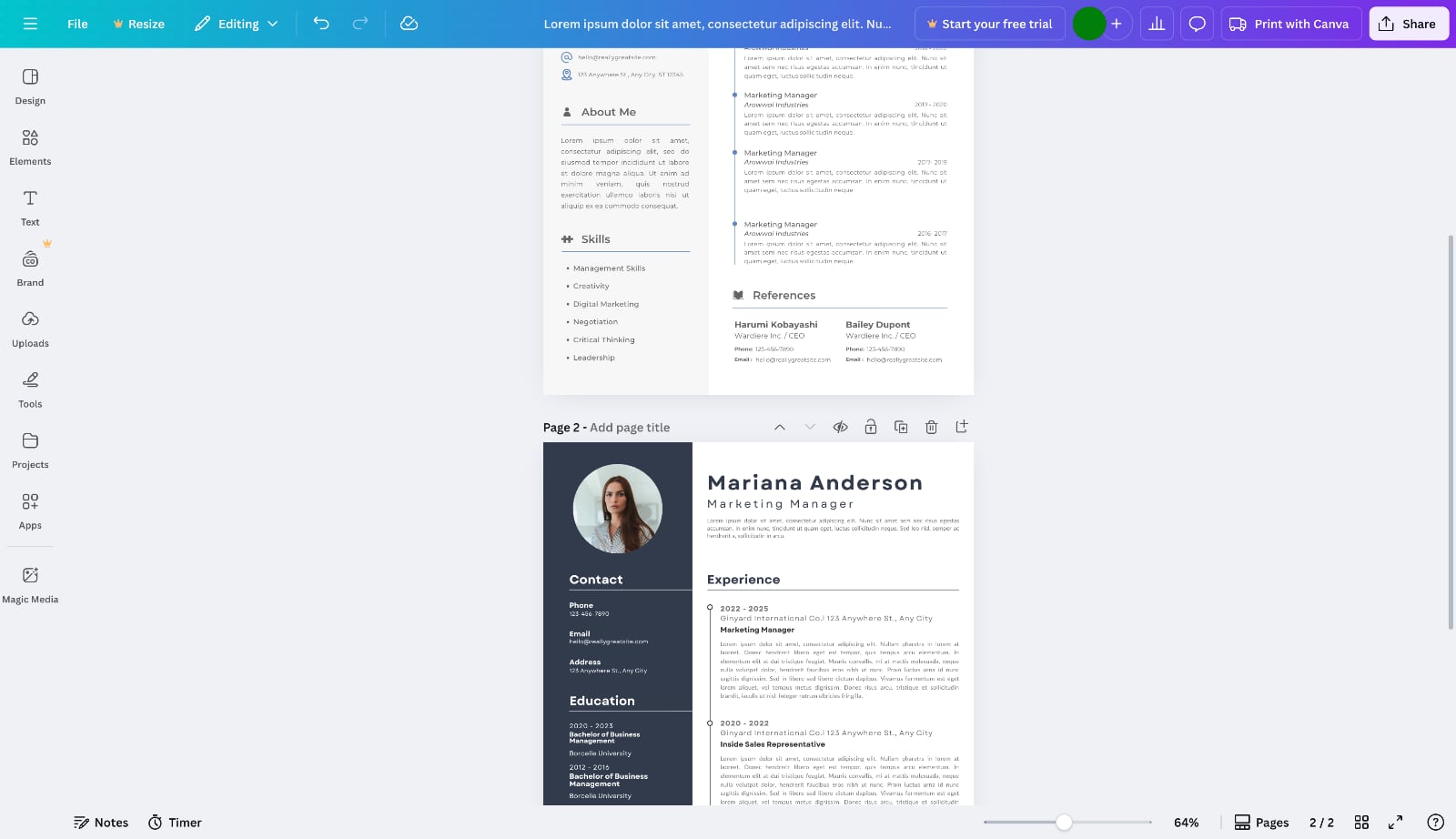
When you switch templates in Canva, you're forced to choose: replace your current page (losing all your carefully written content) or add a new page with the new template (creating an awkward multi-page resume with mismatched templates as shown in the image below). There's no way to preserve your content while changing the template. You have to manually copy and paste everything into the new template's placeholder texts.
Static layout means constant manual adjustments
Canva treats every text block as a positioned object, exactly like Photoshop. When you replace dummy placeholder text with your actual experience and it's longer than expected, it overlaps with the section below. You then manually drag every subsequent section downward. Add another bullet point? Manually move everything. Delete a job? Manually close the gap.
Worse, if your content pushes sections onto a second page, nothing flows automatically. You manually decide what to move to page two, copy those sections, create a new page, paste them, then realign everything. Change your mind? Start over.
And customizing the design requires manually resizing every element—adjusting text boxes, repositioning lines, resizing margins. This isn't just time-consuming; it requires actual design skills to maintain visual balance. What should take seconds becomes a 20-minute design project every time you edit.
Design-first templates leave no room for content
Canva templates prioritize visual appeal over substance, often leaving minimal space for the content that actually matters. Pre-set text boxes force you to compress work experience into a few lines, making it nearly impossible to tell the full story of your accomplishments.
This creates an impossible choice: either leave out important details that demonstrate your value, or overflow the design and break the layout entirely. Senior professionals with years of experience face an even bigger challenge—Canva templates simply can't accommodate substantial career histories without becoming unreadable.
Worse, many templates are overdesigned with decorative elements, colors, and graphics that distract from your qualifications. Recruiters reviewing these resumes may focus on the visual noise rather than your actual skills and achievements. Form wins over function, and your substance gets buried.
2. Understanding the Silent Gatekeeper
Before we dive into why Canva struggles with Applicant Tracking System (ATS), it's important to understand what ATS actually does. When you apply for a job online, your resume almost never goes straight to a human. Instead, it's uploaded into an ATS, which is software that scans, parses, and ranks resumes. Specifically, it does the following:
- Extracts your name, contact info, job titles, dates, and skills
- Converts your file into plain text for analysis
- Compares keywords to the job description
- Scores how well you match the role
Only the top-ranked resumes ever reach a recruiter's screen. If the system can't read your text correctly, it doesn't matter how perfect your design looks. Your resume effectively doesn't exist.
3. Why Canva specifically breaks ATS parsing
Canva is fantastic for visual creativity, but it wasn't built for data extraction or structured parsing, which is what Applicant Tracking System (ATS) relies on. Here's where problems occur:
Text inside text boxes and shapes: Many Canva templates use text boxes layered on top of images, icons, or grids. To the human eye, that looks fine. To an ATS, it's chaos. The software doesn't know which text belongs to which section, or in what order to read it.
Non-linear layouts: Columns, design blocks, and decorative separators often make logical sense visually, but they confuse parsing engines. A left-column job title followed by a right-column description may be read as two unrelated chunks of text.
Custom fonts and spacing: Stylized fonts may render as symbols or blank spaces in plain-text mode. Even minor spacing tweaks can lead to incorrect word breaks, turning "Project Manager" into "ProjectMana ger."
Image-based elements: Any text embedded in an image (like skill bars, icons, or logos) is completely invisible to the ATS. If your skills are displayed as graphical elements, they simply don't exist to the parsing software.A common Canva template might display your skills as colorful bars with percentages. Beautiful to look at, but the ATS sees: [graphic][graphic][graphic] instead of Python, JavaScript, React."
File export format: Canva exports in PDF, but not all PDFs are equal. Most ATS systems prefer text-based PDFs, whereas Canva often creates image-layered PDFs depending on the elements used. Those images can't be parsed.
4. The Structure Problem
But these specific failures all stem from a deeper architectural issue: Canva treats your resume as a flat graphic, not a structured document. Unlike purpose-built resume builders, it doesn't embed semantic hierarchy. There's no proper tagging for "Heading," "Subheading," or "Body Text." When exported as a PDF, all of that becomes unstructured visual data.
A resume that looks perfect to you? To the employer's software, it looks like a half-empty document. So while Canva gives you creative control, it gives zero contextual order to parsing software. What looks elegant visually can translate as nonsense in code.
5. The Real-World Impact
The cumulative effect of these technical issues is devastating:
- Hours wasted on manual repositioning, template rebuilding, and design adjustments that require actual design skills
- Important accomplishments and experience compressed or omitted due to rigid, design-first layouts that prioritize aesthetics over content
- Recruiters either never see your resume (ATS filters it) or get distracted by overdesign when they do (skimming past your qualifications)
- Keywords you optimized for (like "React.js," "UX Research," or "Sales Strategy") might not even be detected by the system
You're either fighting the editing process for hours or getting filtered out by ATS before a human ever sees your name. Not because of your skills, but because you used graphic design software for a document editing task.
What Modern Resume Builders Do Differently
Unlike Canva, which treats your resume as a graphic canvas, purpose-built resume builders combine visual design with structured data. Every element you see is also properly tagged under the hood, ensuring your resume looks beautiful to humans while remaining perfectly readable to the Applicant Tracking System (ATS) software.
Modern resume builders use dynamic reflow. When content changes, everything below automatically adjusts. Sections flow to new pages when needed. Resize one element, and related elements adapt proportionally. This is the fundamental difference between document software and graphic design software.
These real-time, visual editors (often called WYSIWYG resume builders — short for What You See Is What You Get) solve exactly what Canva can't: they give you design flexibility while maintaining the structured data ATS systems require.
The three leading WYSIWYG resume builders are Resume Zap, Enhancv, and Novoresume. We'll use Resume Zap to illustrate how these features work.
Real-Time Editing
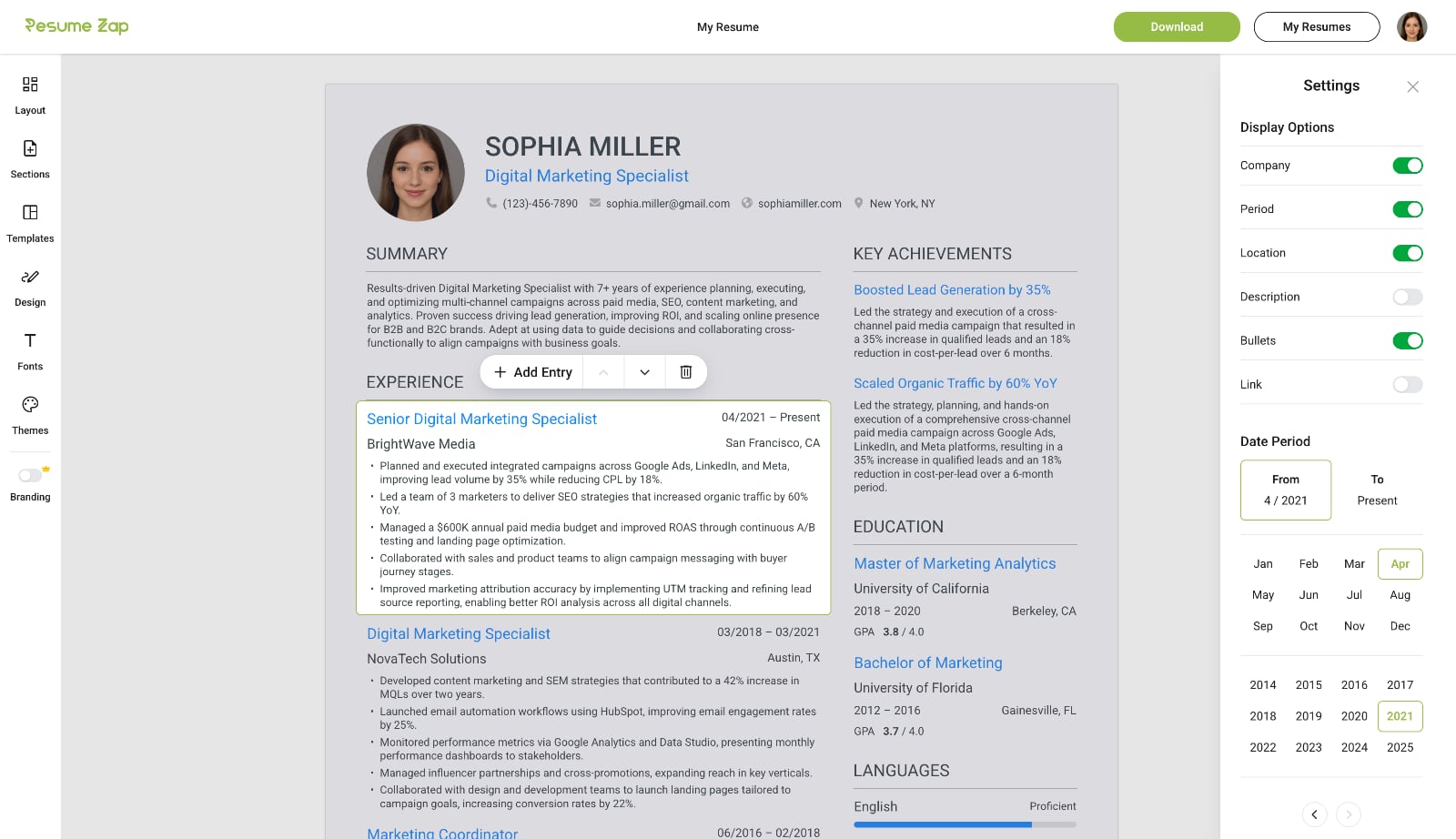
Click anywhere to start typing and easily add, delete, or rearrange sections and entries. Toggle any field on or off to control exactly what appears on your resume. With WYSIWYG resume builders, your changes are reflected instantly with professional formatting handled automatically.
Instant Template Switching
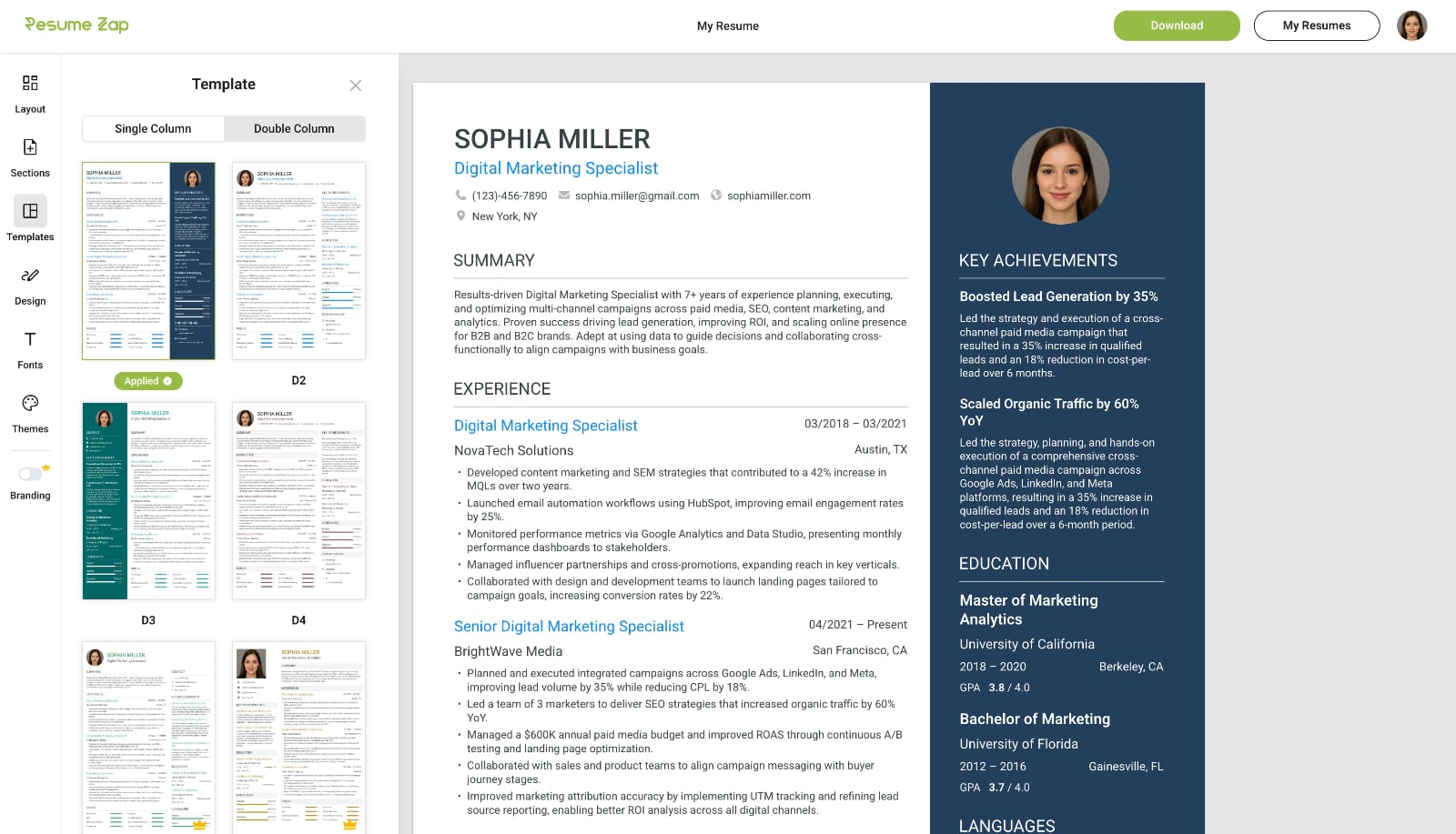
Switch seamlessly between professional resume templates without losing progress — unlike Canva where you would need to start over. Your resume automatically reflows into the new design, letting you explore different styles until you find the perfect fit.
Professional Customization Made Easy
Choose from a wide range of themes, fonts, and unique background images to perfectly match your style and profession. Fine‑tune spacing, padding, text size, sidebar width, and formatting with intuitive, easy‑to‑use controls. Customize how your skills are displayed and instantly show or hide fields with simple toggles.
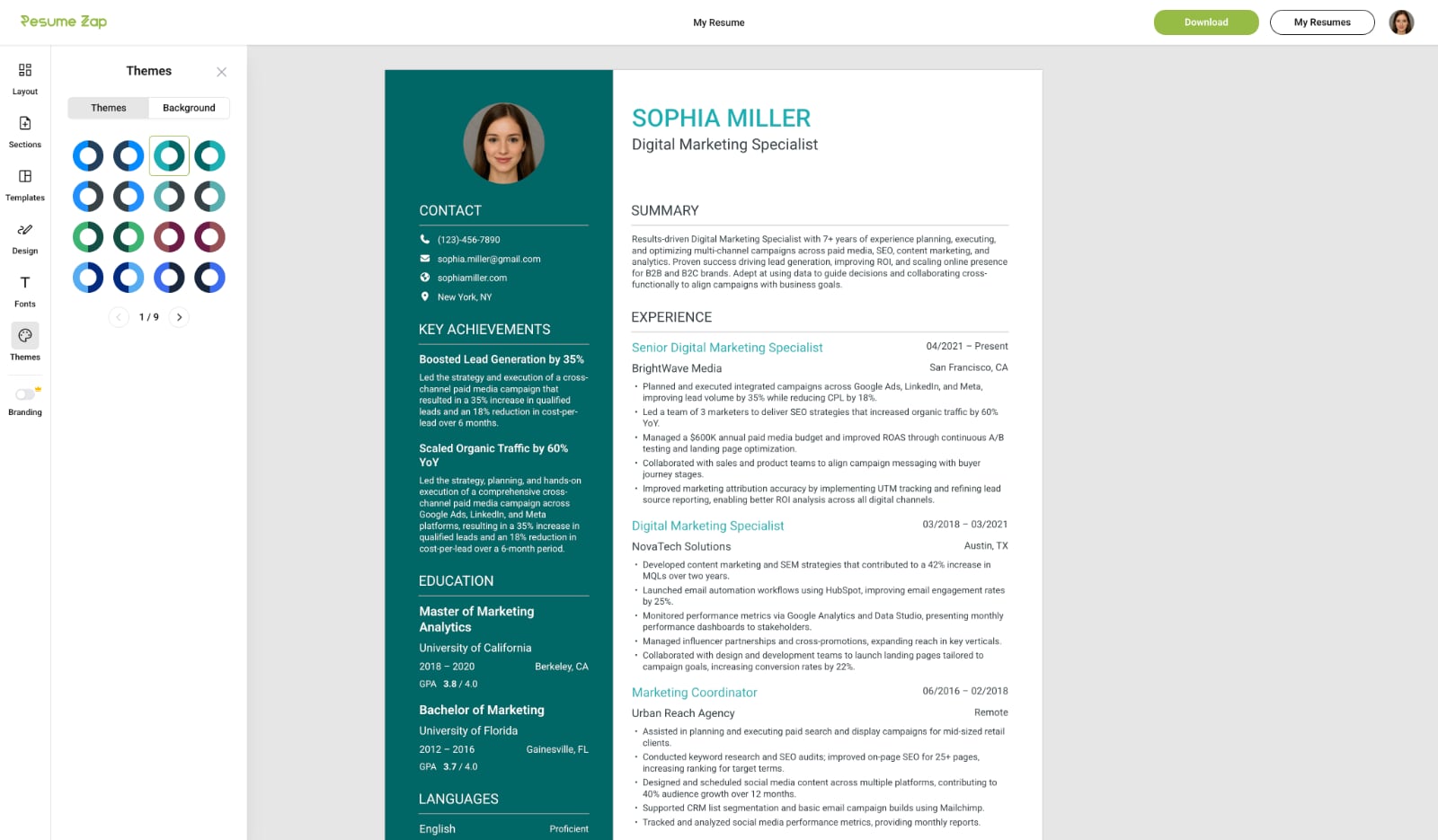
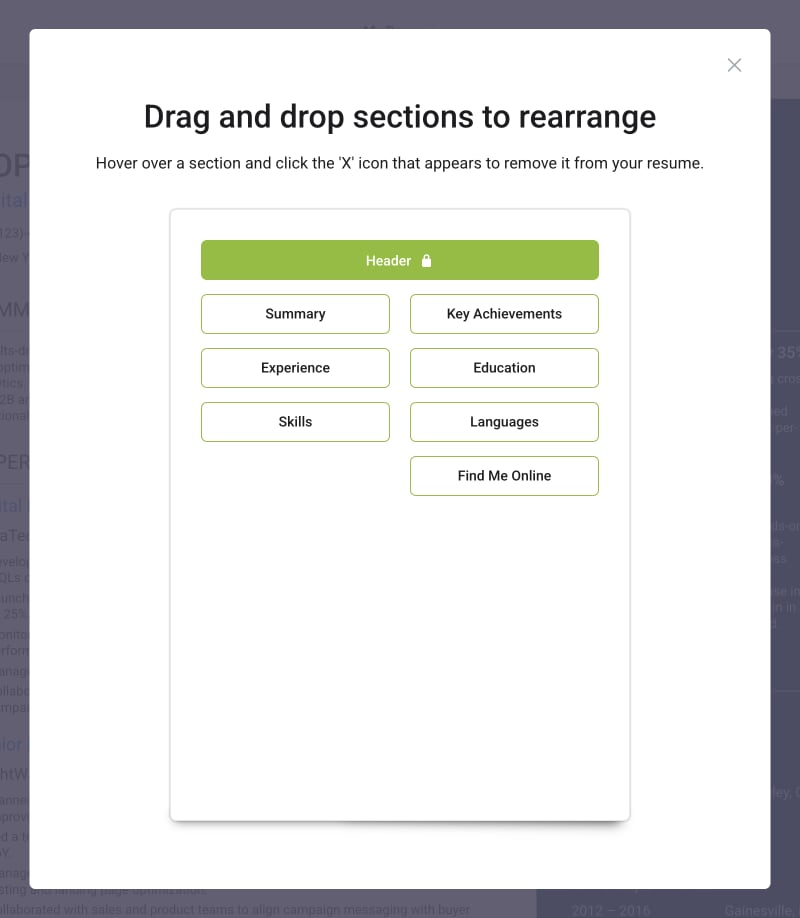
Flexible Layouts
Drag and drop sections to rearrange your resume with ease. Choose wrapped or stacked section layouts with a simple click using intuitive controls.
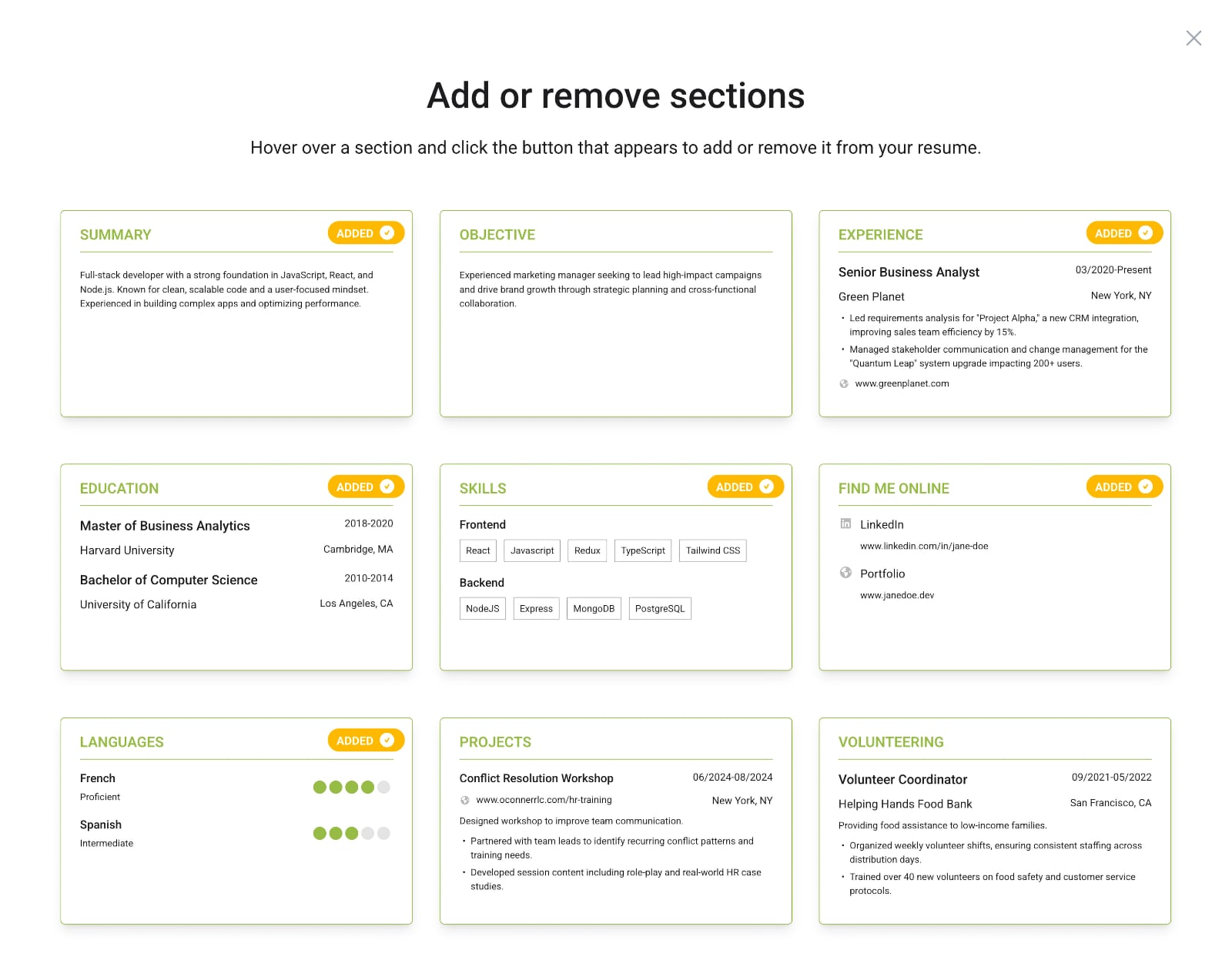
Extensive Section Library
Choose from a comprehensive library of pre-built resume sections that go beyond the basics. From core sections like Experience and Education to specialized ones like Key Achievements, Certifications, Industry Expertise, Publications, Projects, and Volunteering—add exactly what fits your career story. Preview sections before adding them, and remove any with a single click.
WYSIWYG Builder vs Canva
Feature
WYSIWYG Builders
Canva
Real-time editing
Dynamic content reflow
Auto pagination
Professional templates
Easily editable templates
Premade sections
Extensive section library
Drag-and-drop sections to organize
Instant template switching
Easy formatting
No design skills required
ATS-optimized
WYSIWYG Builders
Real-time editingDynamic content reflowAuto paginationProfessional templatesEasily editable templatesPremade sectionsExtensive section libraryDrag-and-drop sections to organizeInstant template switchingEasy formattingNo design skills requiredATS-optimizedCanva
Real-time editingDynamic content reflowAuto paginationProfessional templatesEasily editable templatesPremade sectionsExtensive section libraryDrag-and-drop sections to organizeInstant template switchingEasy formattingNo design skills requiredATS-optimized
Design Beautifully, Apply Intelligently
Canva represents the modern approach to resume design: beautiful, accessible, creative. It empowers anyone to design confidently, but it swung too far toward aesthetics at the expense of structure. This created problems that range from immediate editing frustrations to invisible ATS rejections.
Modern WYSIWYG resume builders bridge that gap. They combine visual design with technical precision, delivering resumes that look stunning to humans and parse flawlessly for machines.
A resume today isn't just a design file. It's a structured data document that must look human, read human, and parse machine. Design beautifully, but apply intelligently. In today's job market, the best-looking resume isn't the one that wins: it's the one that works.
You may also like

Resume Tools
What Is a WYSIWYG Resume Builder?
Traditional resume builders feel like tax forms, and Google Docs makes you fight with formatting. WYSIWYG resume builders solve both problems and are better for creating professional resumes.

Resume Tools
Is Google Docs Good for Resumes? Why It’s Free but Far From Perfect
Google Docs is free and convenient for resumes, but what you see on screen rarely matches what recruiters receive. Discover why this popular tool falls short for professional applications.

Resume Tools
Is Microsoft Word Good for Resumes?
For decades, Microsoft Word was the go-to tool for creating resumes but it still has many major limitations. Discover when Word still makes sense and when it's time to embrace purpose-built tools.
Consumer Protection
Resume Builder Scam: The Hidden Subscription Exposed
Many resume builders use hidden pricing traps. Learn the 5 dark patterns to watch for, from $2.95 trials that become $30/month to missing pricing pages—and how to protect yourself.
Resume Tools
The 5 Best Truly Free Resume Builders of 2026 (No Paywall)
Most resume builders use subscription pricing, which is widely unpopular among job seekers. Explore the curated list of resume builders that avoid subscriptions entirely.

Resume Advice
How to Explain Employment Gaps on Your Resume
Whether due to layoffs, caregiving, education, or personal reasons, employment gaps are normal, and when handled well, they can actually highlight your resilience and adaptability.