Blog
Is Google Docs Good For Resumes
Is Google Docs Good for Resumes? Why It’s Free but Far From Professional

Updated on Feb 18, 2026
Google Docs is free, familiar, and fast. No downloads, no setup, and you can start writing your resume right from your browser. But once you begin tweaking fonts or exporting to PDF, things fall apart. Layout shifts, formatting breaks, and poor ATS compatibility make it unreliable for professional use. It's fine for quick drafts or entry-level applications, but when precision and presentation matter, its limits show fast.
Why People Love Google Docs
It's free, fast, and familiar. You don't need to install anything or worry about compatibility between Windows and macOS. As long as you have a browser, you're good to go. You can choose from a few ready-made templates, fill in your details, and instantly get a decent-looking resume. For students or job seekers in a hurry, Google Docs feels like the path of least resistance.
Its biggest strength is accessibility: automatic saving, easy sharing, and cloud storage that means no lost files. For simple needs, that's hard to beat. But what feels effortless at first often becomes frustrating when you try to make your resume look truly polished and consistent.
Formatting: The Hidden Struggle
Google Docs isn't designed for precision layout control. The moment you start adjusting margins, columns, or tables, the document begins to fight back. A tiny edit (adding a bullet, updating a date, changing job order) can send everything else sliding out of place.
Text boxes shift, bullets misalign, and spacing changes unpredictably. What seems like a harmless tweak often turns into a re-alignment marathon. That instability isn't just cosmetic. It can make your resume look unprofessional or even display incorrectly when uploaded to job portals.
When Formatting Meets the ATS
Even if you manage to get your layout perfect, there's another challenge waiting: Applicant Tracking Systems (ATS). ATS software scans resumes for keywords, structure, and hierarchy. But Google Docs templates often rely on tables, shapes, and non-semantic formatting that confuses these systems. What you see isn't what the software reads.
For example, if you use a two-column table to separate technical and soft skills, the ATS reads left-to-right across both columns:
What you intended: Technical skills in one column, soft skills in another
Technical Skills
Soft Skills
Python
Leadership
JavaScript
Marketing
What the ATS sees: Technical Skills Soft Skills Python Leadership JavaScript Marketing - with no clear indication of which skills belong to which category.
When the ATS can't properly identify your skills section, it may fail to match your qualifications to the job requirements. Your resume gets ranked lower and filtered out before a human ever sees it.
Templates: Quantity vs. Quality
Google Docs offers only a handful of basic templates, and while they look clean, they're not optimized for resumes. They lack visual hierarchy, flexible section control, and modern design options. Adding or removing sections easily breaks the layout.
Want a two-column format or subtle color accents? You'll end up hacking tables or shapes to fake it, and that rarely ends well. The result: you spend more time fixing formatting than refining your story.
Collaboration and Convenience
One of Google Docs' biggest selling points is collaboration. You can share a link, get comments, and edit together in real time (great for essays or reports). But resumes are personal, not group projects. When multiple people edit, layouts shift and comment threads clutter your view. Docs handles simultaneous text edits brilliantly but sacrifices layout consistency in the process. It's collaboration at the cost of control.
File Export: The Breakpoint
When you finally export your resume as a PDF, what you see in Google Docs often doesn't match the final file. Margins move slightly, fonts render differently, and line breaks shift. Those tiny misalignments (half a line too high, a bullet wrapping awkwardly) are invisible while editing but obvious to a recruiter viewing your PDF. For a one-page document meant to look professional, that's a major problem.
What Modern Resume Builders Do Differently
Over the past decade, a new generation of resume builders has redefined what "creating a resume" means, not by adding complexity, but by removing it. Unlike Google Docs, which treats a resume as a collaborative document, modern builders treat it as a design layout. Every font choice, margin, and alignment is built around one goal: to make your information look professionally structured without you having to fight the formatting.
Crucially, they're also optimized for Applicant Tracking Systems (ATS), ensuring your resume looks clean to both humans and software. They run entirely in the browser, syncing instantly across devices. No file versions, no export inconsistencies, and no worrying about whether your spacing will shift when someone opens your PDF.
These real-time, visual editors (often called WYSIWYG resume builders — short for What You See Is What You Get) have fundamentally changed how resumes are made. They don't replace Google Docs's convenience. They simply rethink what power means for resume creation: clarity, speed, and design you can trust.
The three leading WYSIWYG resume builders are Resume Zap, Enhancv, and Novoresume. We'll use Resume Zap to illustrate how these features work.
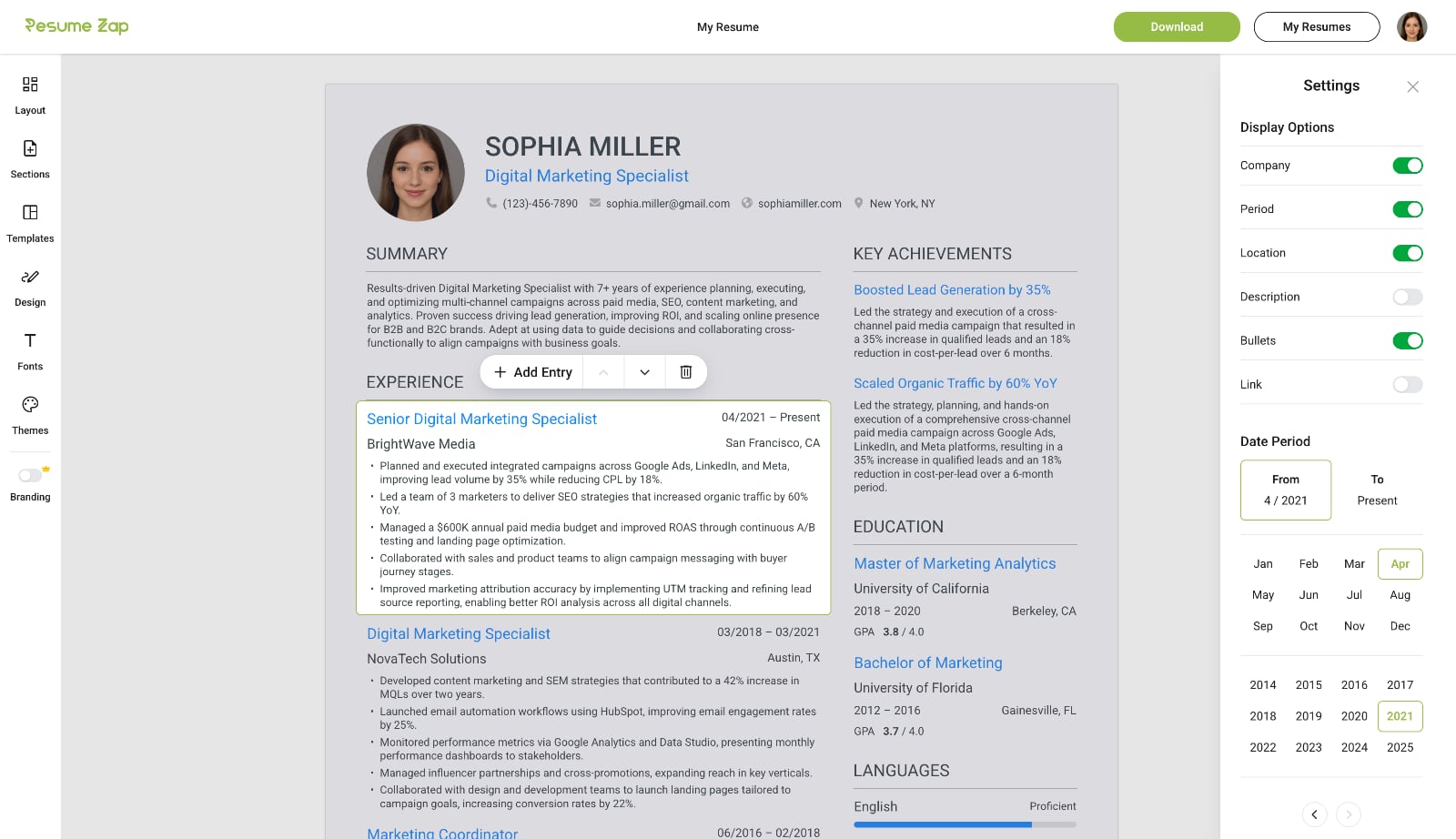
Real-Time Editing
Click anywhere to start typing and easily add, delete, or rearrange sections and entries. Toggle any field on or off to control exactly what appears on your resume. With WYSIWYG resume builders, your changes are reflected instantly with professional formatting handled automatically.
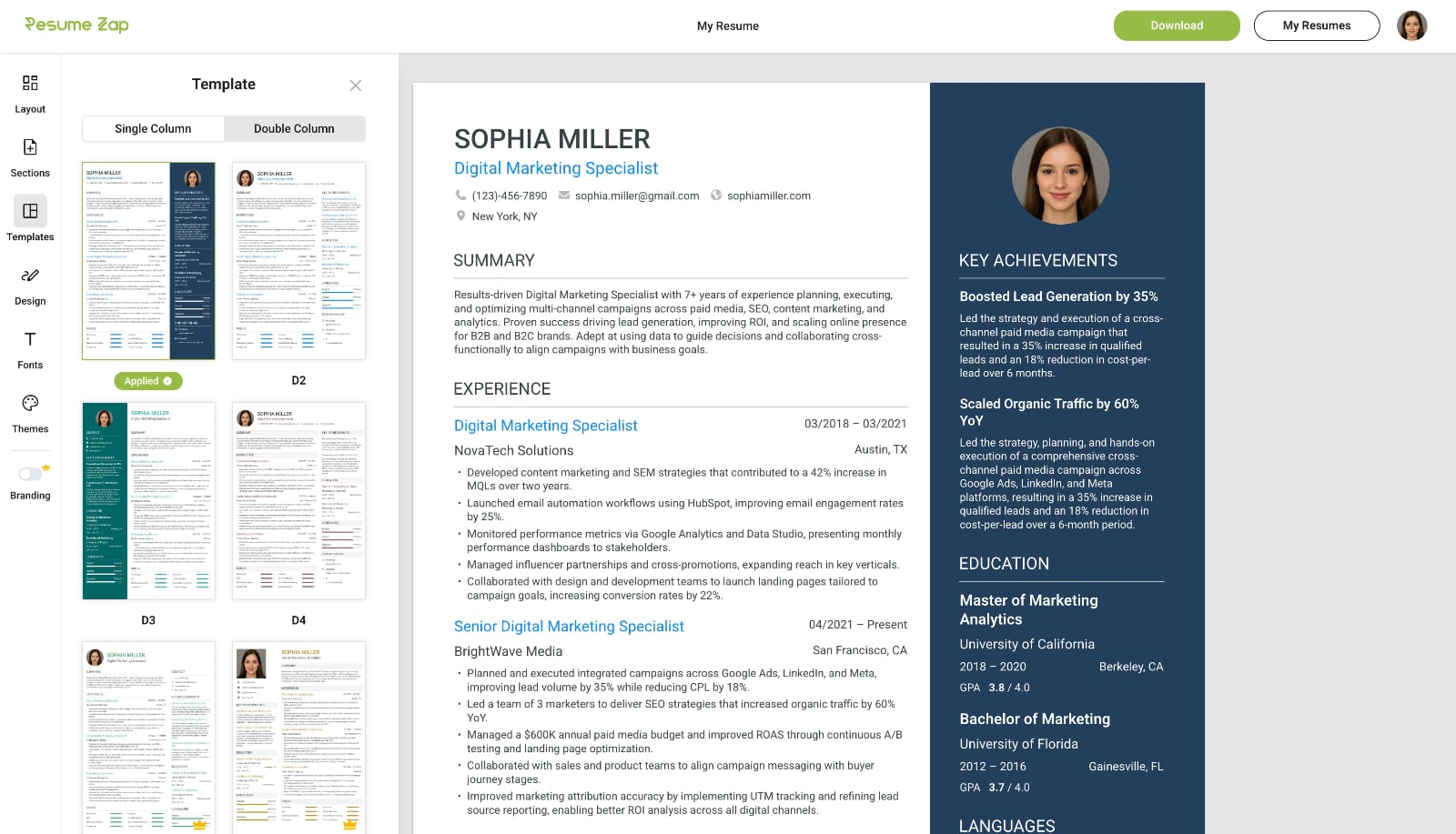
Instant Template Switching
Switch seamlessly between professional resume templates without losing progress — unlike Microsoft Word where you would need to start over. Your resume automatically reflows into the new design, letting you explore different styles until you find the perfect fit.
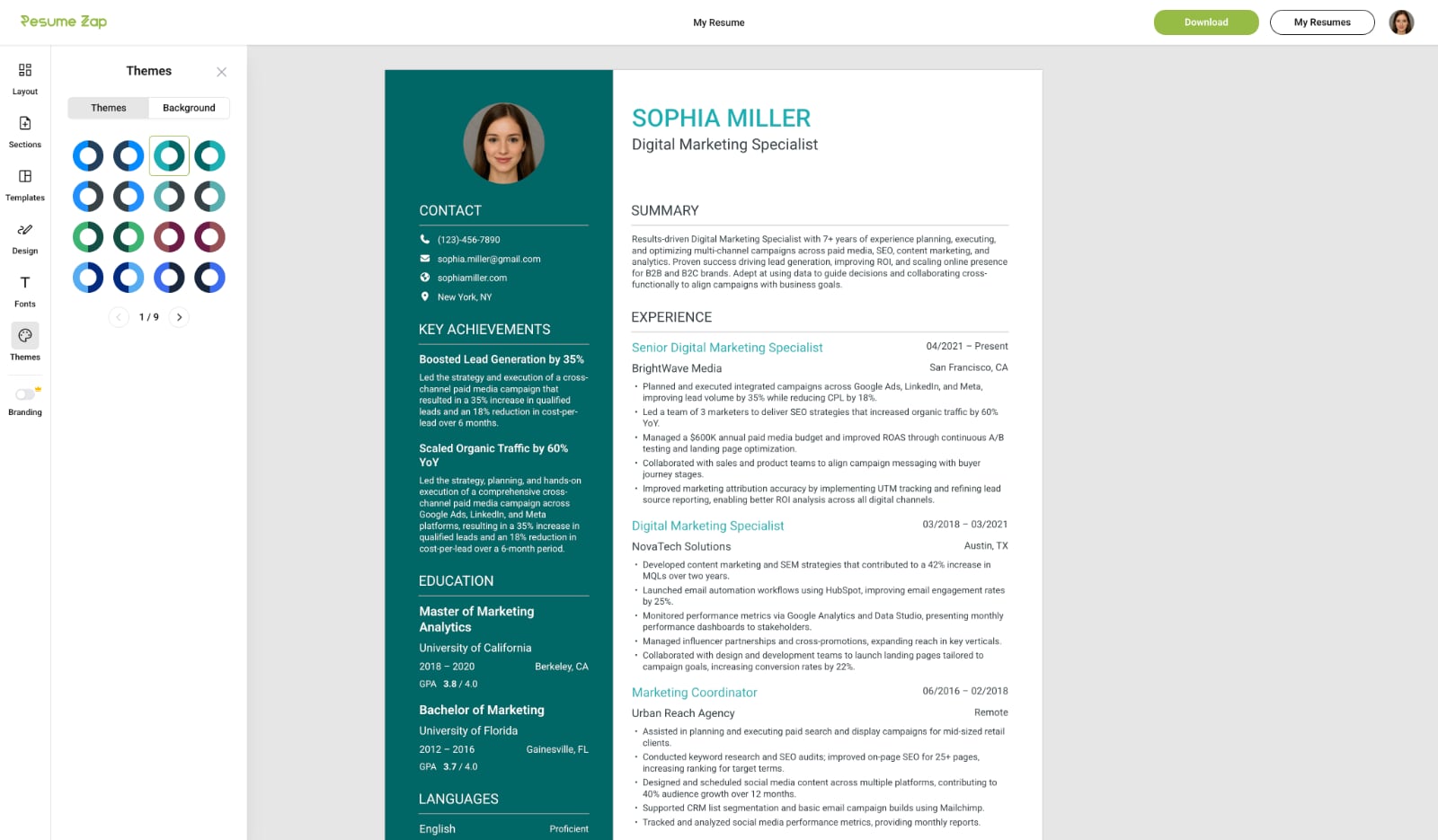
Professional Customization Made Easy
Choose from a wide range of themes, fonts, and unique background images to perfectly match your style and profession. Fine‑tune spacing, padding, text size, sidebar width, and formatting with intuitive, easy‑to‑use controls. Customize how your skills are displayed and instantly show or hide fields with simple toggles.
Flexible Layouts
Drag and drop sections to rearrange your resume with ease. Choose wrapped or stacked section layouts with a simple click using intuitive controls.
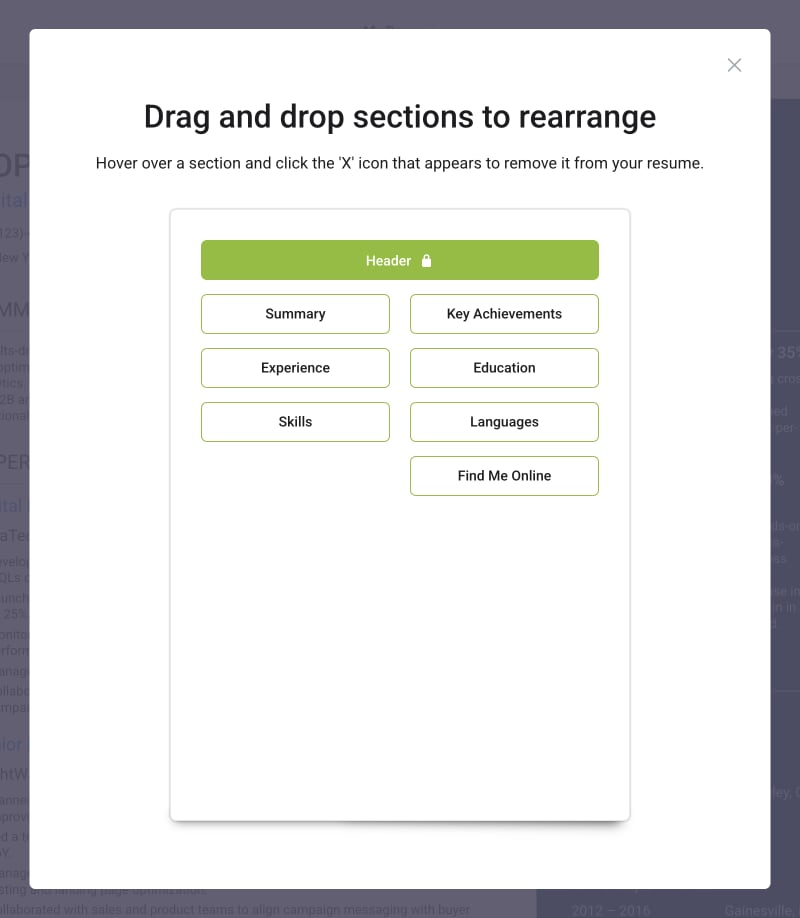
Extensive Section Library
Choose from a comprehensive library of pre-built resume sections that go beyond the basics. From core sections like Experience and Education to specialized ones like Key Achievements, Certifications, Industry Expertise, Publications, Projects, and Volunteering—add exactly what fits your career story. Preview sections before adding them, and remove any with a single click.
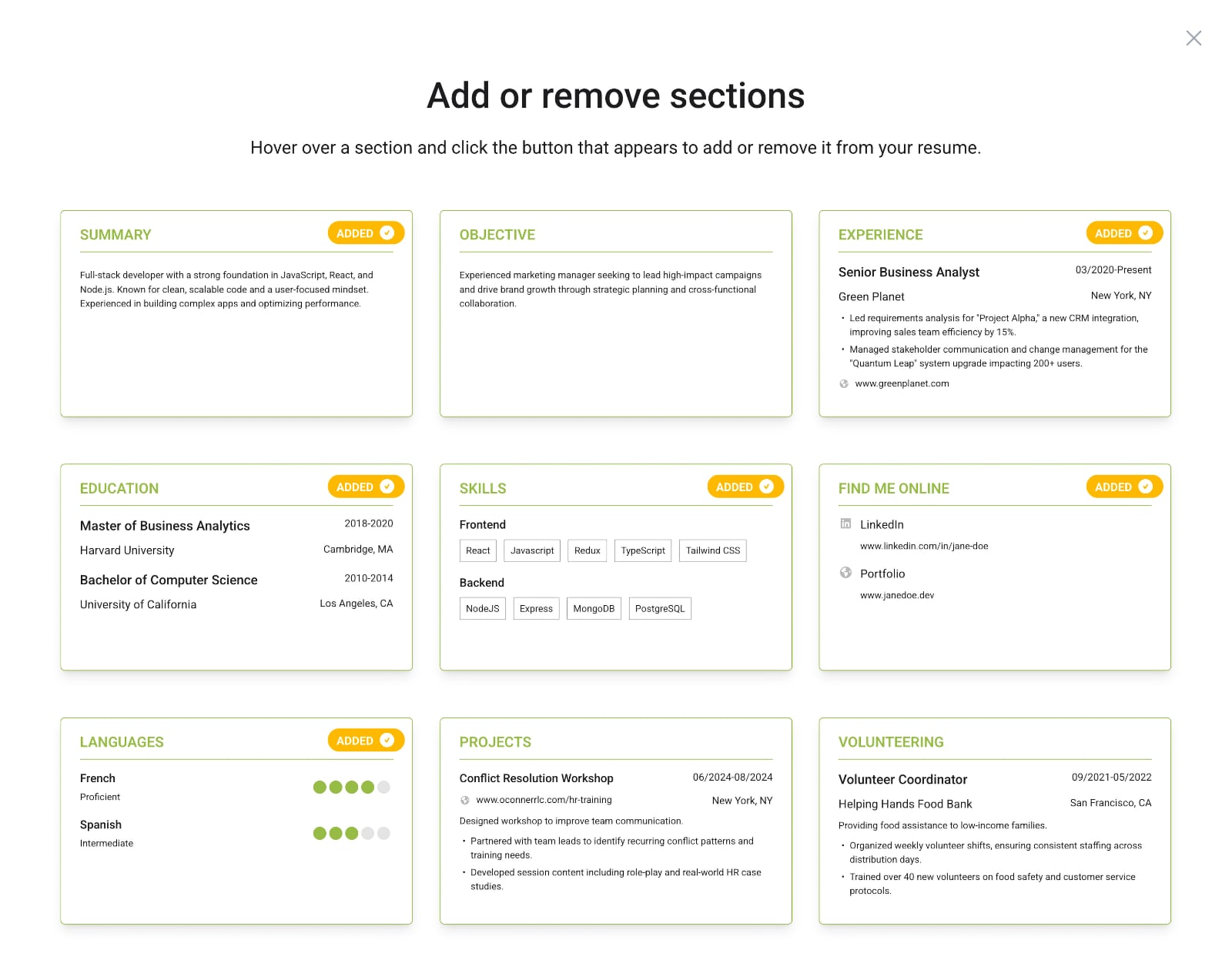
WYSIWYG Builder vs Google Docs
Feature
WYSIWYG Builders
Google Docs
Real-time editing
Collaboration features
Professional templates
Easily editable templates
Premade sections
Extensive section library
Drag-and-drop sections to organize
Instant template switching
Easy formatting
No design skills required
ATS-optimized
Export consistency
PDF preview accuracy
WYSIWYG Builders
Real-time editingCollaboration featuresProfessional templatesEasily editable templatesPremade sectionsExtensive section libraryDrag-and-drop sections to organizeInstant template switchingEasy formattingNo design skills requiredATS-optimizedExport consistencyPDF preview accuracyGoogle Docs
Real-time editingCollaboration featuresProfessional templatesEasily editable templatesPremade sectionsExtensive section libraryDrag-and-drop sections to organizeInstant template switchingEasy formattingNo design skills requiredATS-optimizedExport consistencyPDF preview accuracy
The Real Cost of Free
Google Docs feels free, but it costs you time (time spent fixing alignment, fighting layout drift, and rechecking exports). The difference is simple: Google Docs helps you start your resume while a WYSIWYG builder helps you finish it professionally.
For something as important as your resume, that's an expensive trade-off. While WYSIWYG resume builders typically cost $22-30 for full access, that small investment saves hours of frustration and ensures your document always looks professional—and actually gets seen by recruiters.
The Bottom Line
Google Docs is convenient, accessible, and great for quick drafts, but it's not built for polished resumes. If you're applying to competitive roles or want a document that truly represents your professionalism, the limitations quickly show. In resume building, "good enough" rarely is.
You may also like

Resume Tools
What Is a WYSIWYG Resume Builder?
Traditional resume builders feel like tax forms, and Google Docs makes you fight with formatting. WYSIWYG resume builders solve both problems and are better for creating professional resumes.
Resume Tools
Is Microsoft Word Good for Resumes?
For decades, Microsoft Word was the go-to tool for creating resumes but it still has many major limitations. Discover when Word still makes sense and when it's time to embrace purpose-built tools.
Resume Tools
Is Canva Good for Resumes? Why It's Not Built for the Job
Canva makes stunning resumes, but beauty isn't enough. Learn why Canva resumes often fail ATS scans, and how modern WYSIWYG resume builders bridge the gap between aesthetics and structure.
Consumer Protection
Resume Builder Scam: The Hidden Subscription Exposed
Many resume builders use hidden pricing traps. Learn the 5 dark patterns to watch for, from $2.95 trials that become $30/month to missing pricing pages—and how to protect yourself.

Resume Tools
The 5 Best Truly Free Resume Builders of 2026 (No Paywall)
Most resume builders use subscription pricing, which is widely unpopular among job seekers. Explore the curated list of resume builders that avoid subscriptions entirely.

Resume Advice
How to Explain Employment Gaps on Your Resume
Whether due to layoffs, caregiving, education, or personal reasons, employment gaps are normal, and when handled well, they can actually highlight your resilience and adaptability.